Flexible and modular
Build the integration you need from modular components, and extend it as your business changes.

Connected systems / Connected information
xT connects your internal systems, suppliers and customers in one platform. It retrieves, combines and delivers information, and controls every step of the process.
Product
xT connects your systems, processes, customers and partners in one integration platform, bringing legacy and modern systems together without replacing what already works.
Build the integration you need from modular components, and extend it as your business changes.
Standard building blocks and visual tools help your team build and maintain integrations with less dependency on custom development.
Bring established systems, modern APIs and services together in the same integration flow.
Protect communication and messages while monitoring every exchange, so integrations remain visible and under control.
Benefits
Combine information from several systems and control each step of the process.
Mapping files is simple, and you can reuse mappings across integrations.
Combine modern APIs with established integration patterns without replacing every existing system. xT also handles binary files.
xT Workflow coordinates steps, while xView, tracking, monitoring and alerts support daily operations.
Run xT as a group of servers that share messages and configuration. Add servers to increase capacity, and keep integrations running if a server fails.
Host xT on-premises or in your chosen country or cloud region to support data residency and GDPR requirements.*
* Meeting data residency and GDPR requirements also depends on how the solution is configured and operated.
Technical overview
xT supports the protocols and connection types below, grouped by purpose. Actual support depends on the installed version, modules and configuration.
Encrypted SSL/SSH communication is available with xTRM, HTTPS, FTPS, SFTP and OFTP.
S/MIME and CMS support signing, encryption, verification and decryption. These are security standards, not additional transports.
xT supports both approaches. Choose according to the business process and connected interfaces. Different patterns can run in parallel on the same platform.
Process control
Connect activities into a controlled process: evaluate conditions, run branches in parallel, bring results together and exchange messages.
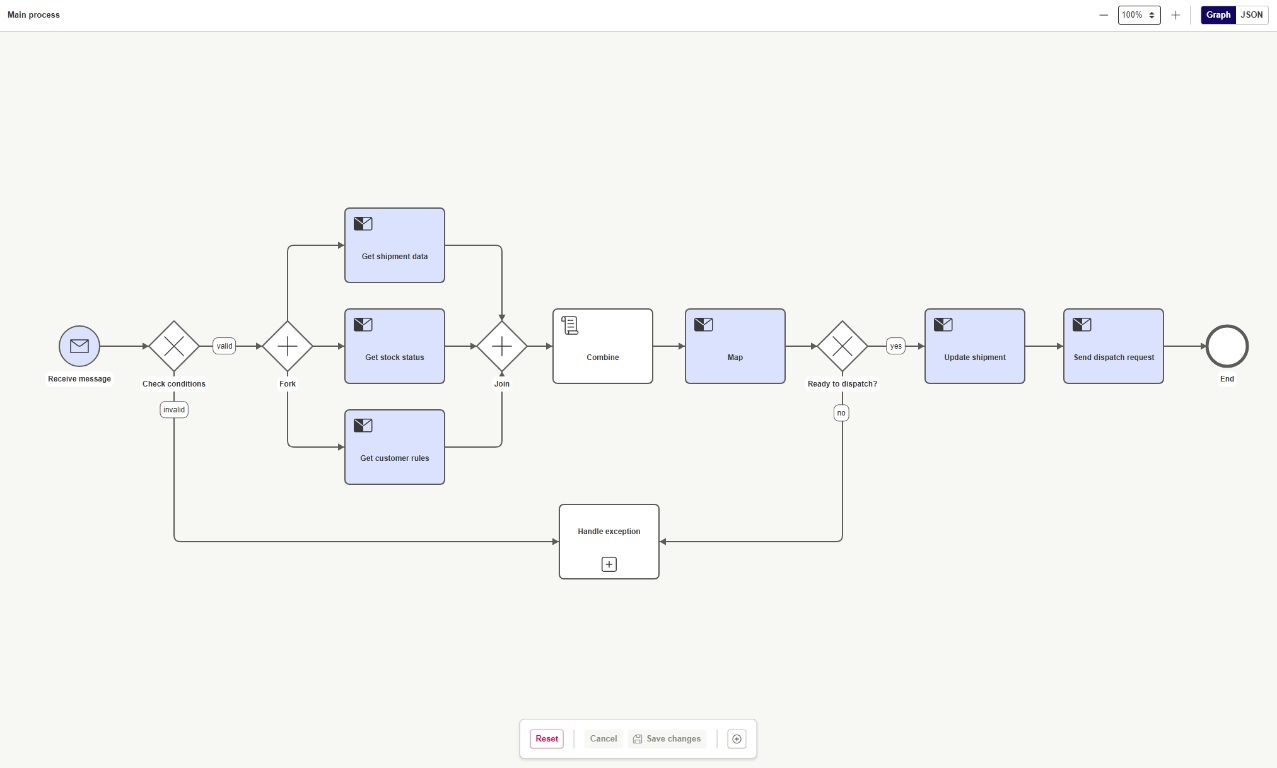
Decisions & parallel work
Decision gateways define alternative paths. Parallel fork and join gateways coordinate multiple branches.
Extensible processing
Workflow definitions include scripts, .NET tasks, subprocesses and loops, plus message, timer and error events.
Retrieve and combine information from multiple systems, then control decisions, updates and delivery within one workflow.
Example
xT can bring together warehouse, customer and shipment information in one integration flow, then deliver the right information to the right recipient.
1 / Retrieve
Stock status from a warehouse system and customer references from a CRM, together with shipment data.
2 / Combine
Combine data, enrich it with database lookups and transform it using mappings.
3 / Deliver
Deliver the message to a customer or partner. Dynamic data can be supplied by the mapping or the server.
Mapping
CargoWise Mapper helps you build mappings that convert information between formats. In an xT integration, each mapping makes sure the receiving system gets the data in the structure it expects.
Reusable mappings
Mapping files is simple. Reuse mappings across integrations instead of starting from scratch.
External lookup
Enrich your mapping with database and REST queries during processing.
CargoWise Mapper
CargoWise Mapper is a graphical, drag-and-drop tool for converting messages between formats. It makes it easy to map files.
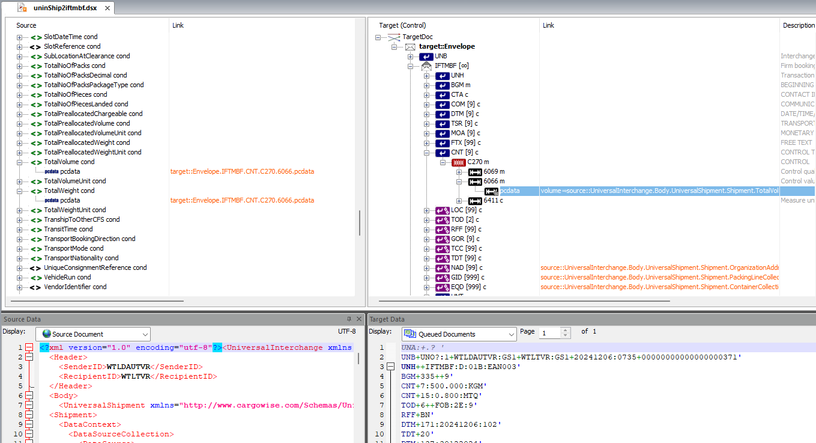
Visual design
Link one-to-one, many-to-one and one-to-many fields in a graphical editor. Built-in functions cover string, date and code conversions.
Formats
Map between XML, EDIFACT, JSON, CSV, Excel and flat files. Create your own definitions when a format is not included.
Test and debug
Run a mapping against test data and compare the result with the expected output. Use trace, step-through and breakpoints to find issues quickly.
Large files
Serial streaming processes files of several gigabytes without loading them fully into memory. Performance depends on the hardware.
xT retrieves, combines and enriches information from multiple systems, controls the workflow, and delivers the result. Mapping is one important step in that process.
Industries
xT is used in many different industries and applications.
Partners
We work with partners who build and deliver solutions on top of xT.
An IT company offering market-leading solutions, consulting and support in information management and system integration.
Contact
Get in touch and we will help you find the right integration solution.
For more information about WiseTech Global, visit wisetechglobal.com.